Overview
You will deliver the following:
Reduced data through any
pre-processing.Code that will:
Collect Data (if there is any
web scrapingor use of other tools)Reduce, Filter and Organize the data
Test (if you are doing the Unit Test Challenge)
Sketches of target plots
Some Unit Tests (Challenge Goal only)
Document your organized data in
README.mdfiles.
More often than not, the raw data is not ready for plotting. The data needs to be rearranged and organized into a format that allows for matplotlib.pyplot to plot. The data may need to be reduced, filtered, joined, calculated or reorganized.
Sketches of Plots
Think about the types of plots you want to create and how those could answer the questions you’ve posed. Be creative and hypothetical in this step. Imagine what a plot would look like and then sketch it out by hand or using Paint.
The goal is to imagine what your plots might look like while not constraining yourself by your coding abilities. Consider ways to convey information while assuming data values. If you find that you’re drawing simple, repetitive bar plots or line plots, then you need to dig deeper into your creativity. Get some inspiration by looking at other published reports and visualizations.
Good Features
Fabulous sketches will:
Reasonably “answer” all your questions
Have a Title with the axes labeled
Be easy to read (not crowded, not sloppy)
Include 4 or more different types of plots
Include color, legends, and/or annotations
Achievable with the data you’ve collected
Illustrate Challenge Goals such as:
Plots of ML Model predictions
Controls in interactive plots
Things to consider:
How you might annotate your plots with values
Whether a curve of best fit is appropriate
How statistical significance might be added
How to sort values to make it more visually appealing
Use a TimeSeries - Average by some timeframe
How to layer more information into a single plot
How to use different types of plots along with impressive versions of each:
Bar Charts
Pie Charts
Box and Whisker Plots
Histograms
Swarm Plots
Area Plots
Line Plots (Regression plots)
Scatter Plots
Geospatial
Heatmap
Sample Sketch
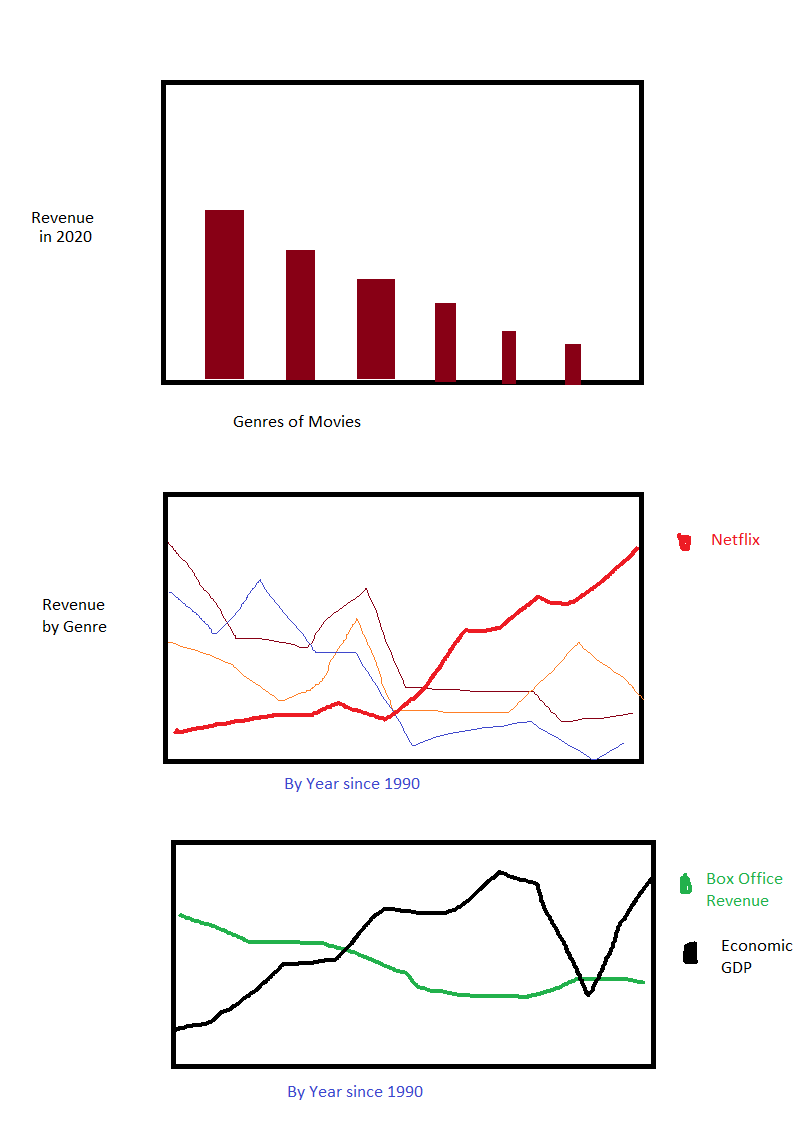
This sketch was created in Paint in about 15 minutes. These are sketches for a hypothetical project on the box office revenues of movies. The project is attempting to show correlation between box office revenues, Netflix earnings, and America’s GDP.
Do not be fooled! This sketch represents C quality work. The sketches illustrate a few things that should be addressed early. Before submitting this Data Organization Deliverable, the sketches should be updated to address these shortcomings:
There are only 3 plots. Ouch!
The y-axes are not all labeled.
The bar chart showing genre of movies does not add any value to the research question. It is good that the bars are sorted by value, but there is no point to the chart.
Lacking annotation. The bar chart could have values added to the top of the bars (or inside the bars). The line plots could highlight inflection points.
Needs more creativity. Having only barchart and line plots is not enough. While line plots are fantastic at identifying correlations, there are other plots and activities that are great at showing correlation. The following example correlation methods may not be appropriate given the data collected or my research question. Regardless, here are some other methods:
Machine Learning and Feature Importance
Plotting Netflix vs GDP and then adding Statistical information such as
Coefficient of Determination.
The graphs do not sufficiently deter critical counter arguments. For example, even though there is a negative correlation between Box Office revenue and Netflix earnings, we could show that other popular streaming services do (or do not) correlate.
There are some positive realizations from doing these sketches that will impact my project’s efforts:
I need data by year
I need to be able to do
twinxplots--to plot lines with different scales on the same axis
GitHub Project
You must follow the structure found in the template project. The GitHub project has several important folders and files describe below.
Organization of Files & Folders
Follow the directions in the ./data_organized/README.md and other related README.md files in subfolders.
/README.md: Follow directions in this file - document the overall project. Document your challenge goals completed as part of the data organization phase such as unit-test, web-scraping, multiple-datasets (+”new library” if this was used for data organization).data_organized: This will contain data that is small enough for consumption and ready to be plotted. If the raw data from thediscovery_raw_datadata sources is dirty or too big for quick and repeated consumption, you need to reduce, normalize and organize the data first. After you’ve cleaned and organized it, save the processed data into this folder. However, if the raw data is clean and small enough, and it does not need any preprocesssing, you can copy and store the raw data here (and update your./discovery_raw_data/README.mdaccordingly)data_organized/README.md: This should be updated with the directions needed for your teacher to run your preprocessing steps. You will document the generated tables and the main columns of data that you have generated for this preprocessing (similar to your discovery document for your raw data)../data_organized/test_data: If you do a lot of data organization, you will want to test your code with test data. Store that test data here. Furthermore, in some uncommon cases you will have plots that will need to be “tested” by plotting fake (or test) data. _Also update theREADME.mdfile here with directions for running your test filerun_tests.py../data_organized/sketches/README.md: Submit your plot sketches to./data_organized/sketchesand update yourREADME.mdfile with a table of links and a description of each sketch and how it will help address a specific research question. Include sketches for the challenge goals for machine learning or interactive plots.The code must run from a new clone from GitHub with an explanation in the
README.mdfile explaining the steps to run the code locally. Your code should be added to./data_organized/preprocess_data.pyto process yourdiscovery_raw_data.
Preprocessing Data
To reduce processing time you should save your processed data into the folder ‘data_organized’. You can do this with: df.to_csv('data_organized/filename.csv')
You will spend a surprising amount of time in this area. You will be much more successful if you can complete this early.
You may have additional helper files besides preprocess_data.py, but, this file should be the entry point for that activity.
You should test this file’s code in run_tests.py.
Each file has a header comment that explains what code belongs in each file. These files should have the main-method pattern to allow one to execute that functionality only.